2016-10-06

Gifting for International Coffee Day

Mmmmmm, coffee.....joe, nectar of the gods.

In celebration of international coffee day, and the molecular blessing that is caffeine, I will be buying this perfect gift, the essential This is Not a Paper Cup cup to my fellow Portage Design employee.

While I'm at it, I think I should start looking for stocking stuffers & christmas gifts.


2016-03-04

New ECHO Drawing Management System by DCM coming soon...

The preview of the latest ECHO DMS release by DCM looks awesome.  Have a look here.  My previous company had tonnes of CAD drawings.  We used to store them on Windows network file systems and later on SharePoint with some very basic metadata.  By a proper Drawing Management System like ECHO would have been a huge boost to productivity.  The expense of not working from the latest drawing can be enormous.

2015-07-07

Document Check-out Done Right

The Drawing Management System (DMS) by DCM has a revision control feature I very much like.  Not only does it support the typical check-in comments, but also check-out comments.  It's nice to know not only who, but why and when my colleague has the document checked-out.  Putting a simple content to this transaction can save a phone call or email in the process if I see that they just have the drawing or document just out for a few minutes or many weeks, and have forgotten about their check-out. 

As a manager, it can also help me keep tabs on the work in progress of my staff without pestering them for updates.

http://dcminc.ca/drawing-tip-2-check-in-check-out/

2014-05-12

2014-04-30

IE Vulnerability in a post-WinXP Support Era

US Dept. of Homeland Security official advisory of recent Internet Explorer vulnerability affecting version 6 to 11 of the popular & default WinOS browser.

http://www.us-cert.gov/ncas/current-activity/2014/04/28/Microsoft-Internet-Explorer-Use-After-Free-Vulnerability-Being

Microsoft now has an accompanying security advisory, with many technical details and work around of using the Enhanced Security Feature of IE.

https://technet.microsoft.com/en-US/library/security/2963983

If you are on WinXP however, IE 8 the last version of Internet Explorer available to you an now patch will be released.  In this case, you should strong consider installing and using another browser such as Firefox or Google Chrome.  On WinXP computer you many want to kill IE so that it never gets used even by a user who manually invokes the application directly.

Here's how to kill IE once and for all on WinXP: http://www.runbooks.info/p/disable-internet-explorer-on-winxp.html


2014-04-08

Heartbleed Bug OpenSSL

Possible one of the most significant security bugs in recent times. Any server running OpenSSL 1.0.1 through 1.0.1f (inclusive) is vulnerable to this security threat.   As this is a common package on many Linux distros, a very large number of Internet servers, hosting everything from websites, ecommerce sites, email system, instant message, etc. are likely affected by this bug.

By exploing this memory leak the server's private key can be compromised.  The attack leave no trace. With the private key in hand, attackers could decrypt any past and future secure traffic that used/uses this key.

For the average Internet user, this potentially means that your password used to access a given secure website, (on a server affected by this bug), could be determined by anyone who has access to a copy data packets exchange between you and the "secure" server.  This could be anyone who has access to the path on which your data flows between client and web server, local network administrator, ISP, (NSA it goes without saying).    

What Happens Now:
Sys Admin will need to patch their system and get new private keys re-issued.
User should change their password on their system is fully patched and operating with new keys.

The affected version of OpenSSL are included by default in the following Linux operating system.

  • Debian Wheezy (stable), OpenSSL 1.0.1e-2+deb7u4
  • Ubuntu 12.04.4 LTS, OpenSSL 1.0.1-4ubuntu5.11
  • CentOS 6.5, OpenSSL 1.0.1e-15
  • Fedora 18, OpenSSL 1.0.1e-4
  • OpenBSD 5.3 (OpenSSL 1.0.1c 10 May 2012) and 5.4 (OpenSSL 1.0.1c 10 May 2012)
  • FreeBSD 10.0 - OpenSSL 1.0.1e 11 Feb 2013
  • NetBSD 5.0.2 (OpenSSL 1.0.1e)
  • OpenSUSE 12.2 (OpenSSL 1.0.1c)


OpenSSL Security Advisory from 07 Apr 2014 (http://www.openssl.org/news/secadv_20140407.txt)

2014-03-28

Windows Virtual PC does NOT Support 64-bit Guest OS

Really!?!

http://social.technet.microsoft.com/Forums/windows/en-US/577ca89f-22da-4896-bc63-e724c38950a7/windows-virtual-pc-support-64-bits-guest-os?forum=w7itprovirt

Like many others in the ensuing thread discussion on TechNet, this is annoying, frustrating and, why Microsoft, WHY?  Another example of Microsoft crippleware perhaps?

If you are a developer or administrator, and need a virtual OS instance to test/demo software, it's likely that you need to TEST on a 64-bit OS, as these are now the norm for any new builds.

Instead, your options for a free virtual machine that can house a 64-bit guest OS are Oracle's VirtualBox or VMWare Player.  I guess Microsoft only wants you to use Virtual PC to run 32-bit Windows XP.


2014-03-20

Microsoft Office 365: Outlook (OWA) to Office Docs (One Drive Pro) FAIL!!!

Thought I'd give Office 365 a test spin.  Certainly the low cost per month for OWA and Office functionality has it's appeal.  Took me less than 2 minutes to figure out MS still doesn't have a clue what a modern mesh of integrated web application should look and function like.

Take the simplest of Use Cases:  Someone just emailed me a Word Document.  Great, I'd like to save this to my One Drive and continue to edit it from there using MS Word.  Being familiar to Google Gmail/Drive/GoogleDoc platform, I just expected this to be a simple series of clicks, I thought that was the whole point of webifying everything.  WRONG.  Instead you must, download the document to your local computer and then upload it to SkyDrive, (I mean OneDrive ;-)

MS Support Thread Regarding this Use Case: http://community.office365.com/en-us/forums/154/t/187507.aspx

Now this isn't the end of the world, is actually a relatively trivial task, but it sucks and I can see a number of problems with it.  What if I'm not using my personal PC and I don't want to save document to the local disk.  At a web cafe or someone elses PC, I won't be sure that I can securely erase what I save locally.  Having worked an IT Helpdesk, I can tell you for a fact that many users have trouble locating where on local disk they save things via browser download.  This download / upload process requires them to remember a location twice.

Upon noticing this flaw I submitted an Office 365 feedback.  This was my reply to MS:

With an Office 365 subscription, Documents can't be save directly from OWA to OneDrive Pro.  Are you kidding me!?!?

I think your requirements should have looked something like this:

1.) A functional Webmail client
2.) A functional Web Office Suite
3.) 1 & 2 work together nicely, in something that resembles a half competent Web 2.0 web app.

Back to Gmail for me, thanks for coming out to try-outs Microsoft.

2014-03-18

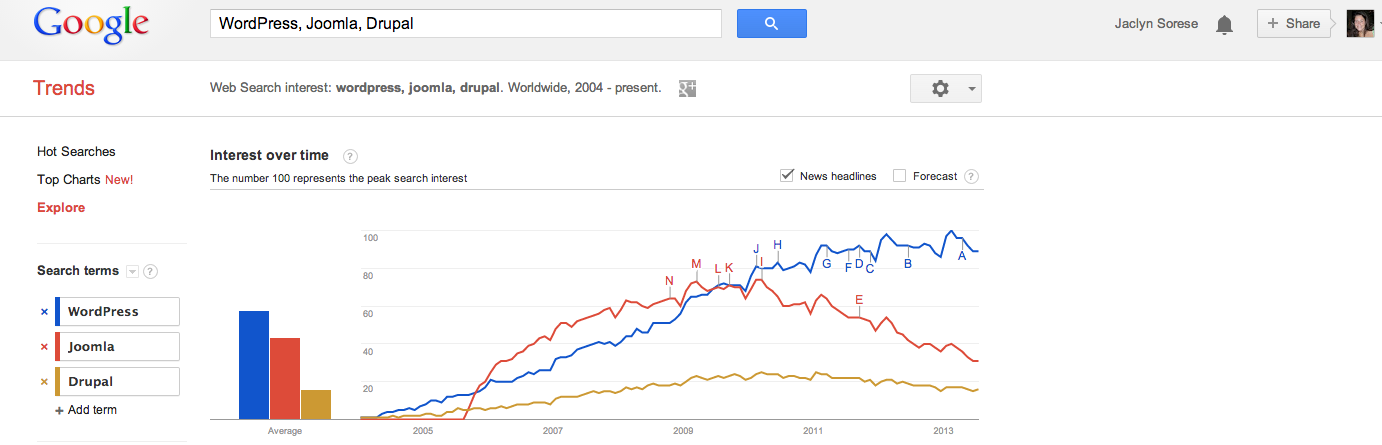
WordPress Myths

Clarifying a few myths you do hear once in a while regarding WordPress. http://portagedesign.com/wordpress-myths/

Very interesting point is the growing interest over time in terms of Google Search results.  I would like to see this compared to some numbers on active installations on the Internet.  Does anyone know where to find such numbers?


2014-02-21

Whitby Realtor for Whitby Waterfront Condo

In the market for Whitby Waterfront Condo?  The website of Carol A Norris, ReMax REALTOR® for the Whitby and Durham areas, has some great information about the Condo buildings in the area, complete with pictures of the properties, list of amenities within and floor plans of the various suites available in each condominium building.

The Yacht Club
The Rowe
The Sailwinds

Enable reiserfs support on CentOS 6.5

Needed CentOS 6.5 support for reiserfs to pull data off an old boot drive from a SUSE box.  These instructions worked perfectly.  Just needed to change 6-4 to 6-5.


Linux/BSD: sharing experiences: HowTo: Enable reiserfs support on CentOS 6.2 and S...: By default RHEL clones such as CentOS and Scientific Linux don't come with ReiserFS filesystem support. However the ELRepo repository ha...

2013-12-01

Netflix for Linux

Followed these instructions (http://crunchbang.org/forums/viewtopic.php?pid=281492, thank Die Hard) and was able to get NetFlix working on Crunchbang, Waldorf 32-bit Debian derivative.


# 64-bit OS: Must also do these steps:
sudo dpkg --add-architecture i386

sudo geany /etc/apt/sources.list
# change line as follows, then save and exit 
ORIG: deb http://packages.crunchbang.org/waldorf waldorf main
NEW:  deb [arch=amd64,i386] http://packages.crunchbang.org/waldorf waldorf main

sudo apt-get update
sudo apt-get install libwine

# END 64-bit only pre-amble


sudo apt-add-repository ppa:ehoover/compholio

sudo geany /etc/apt/sources.list.d/ehoover-compholio-wheezy.list

# change the two lines in the file to the following & save.
deb http://ppa.launchpad.net/ehoover/compholio/ubuntu quantal main
deb-src http://ppa.launchpad.net/ehoover/compholio/ubuntu quantal main

sudo apt-get update

sudo apt-get install netflix-desktop

sudo apt-get install ttf-mscorefonts-installer

sudo echo ttf-mscorefonts-installer msttcorefonts/accepted-mscorefonts-eula select true | sudo debconf-set-selections

netflix-desktop

2013-11-28

Puppy Linux (Slacko 5.6) Default Root Password

Followed a set of on-line instructions to make Puppy Linux require a password upon boot-up.  This article claimed that the root password, unless otherwise set, was blank.  To my surprise this was not correct for my recent Slacko Puppy version 5.6.  With some further digging I did find that the Puppy Linux (Slacko 5.6) default root password is "woofwoof".

2013-11-22

Reporting on Active Directory User Account Lockouts Event 644

Active Directory Security - Even with complex password and lockout policies in place, in theory a very slow brute force attack could compromise a privileged user password.  i.e. 5 attempts before lockout, lockout for 5 mins, means someone could attempt about 60 passwords an hour, 1440 in a 24-hour period.  If a user doesn't notices that they account is locked out and notified IT for an unlock, i.e. while away on vacation, someone with a few password hints might have enough time to slowly brute force their way in.

As such, it's a good idea to get reports of when a lockout occurs of User AD accounts.  Even if only so that an Administrator can see that the same account is repeatedly locked out, and thus potentially the target of a repeated password guess attack.

There are Active Directory Tools and Log Reporting Suites that can do great job of this task and a whole lot more, but for smaller shops this might be too expensive or complex to install and maintain.

A simple control, would a small Windows Power Shell script that reports via email, all Active Directory User Lockout Events in the last 24 hours.  If the same account is repeatedly locked out, you either have a very distressed user or a potential password compromise attack.

The following is designed for Windows Server 2003 Domains.

Windows Power Shell (2.0) Script: LOCKOUT-ALERT.PS1

# get start date
$start = get-date

# get 644 events from server ad1 for last 24 hours $msg_ad1 = get-eventlog -log security -computer ad1 | where-object {$_.EventID -match "^644" -AND $_.TimeGenerated -gt (get-date).AddHours(-24) } | Format-List | Out-String

$msg_ad2 = get-eventlog -log security -computer ad2 | where-object {$_.EventID -match "^644" -AND $_.TimeGenerated -gt (get-date).AddHours(-24) } | Format-List | Out-String

# ... repeat for each server in your domain ...

# get start date
$end = get-date

$msg = $msg_ad1 + $msg_ad2

if ($msg) { # if anything to report
  $msg = "Script run on hostname. " + $start.ToString() + $msg + $end.ToString()
  Send-MailMessage -To "itadmin@mydomain.com" -Subject "Lockout Alerts" -Body $msg -SmtpServer 10.10.10.10 -From "lockout@domain.com" 
}

Step to Install & Configure Event 644 Lockout Monitoring:

  1. Ensure that your Security Event log on each server is set large enough to hold well over 24 hours of logging.
  2. Install PowerShell (http://support.microsoft.com/kb/968929) if not already installed.
  3. Start > Programs > Accessories > Windows Power Shell > Windows Power Shell
  4. In order to run PowerShell scripts you need to execute the following command within PowerShell :> Set-ExecutionPolicy Unrestricted
  5. Create a batch script to run the PowerShell script, one-line: c:\windows\system32\windowspowershell\v1.0\powershell.exe -NoLogo -NonInteractive c:\apps\ps\lockout-alert.ps1
  6. Schedule the script to run once a day.


2013-11-12

Polycom VSX7000 Behind Router/Firewall with Port Forwarding

The Polycom VSX 7000 can function perfectly well from behind a NAT firewall router with port forwarding enabled accordingly.  I was able to get ours to work very quickly by configuring the video conference device as follows:

  • Login to the Web interface for the device.  The default login credentials for the Polycom VSX7000 is username "admin" and the password is the full serial number of the device.
  • Go to the Network > IP Network portion of the menu, and see the Firewall section of the page.
  • Settings should be:
  • Fixed Port, yes apply check mark.
  • For TCP & UDP Ports: enter 3230 as the starting values.
  • Under NAT Configuration, specify manual.
  • Specify NAT Public (WAN) Address, as the Internet IP of your firewall router device.
On your Router / Firewall, configure Port Forwarding for the following range of ports  to the LAN IP of your Polycom.
  • 3230 to 3235 TCP & UDP
  • 1720 TCP & UDP

2013-11-06

Kawartha Lakes Web Design Promotion from Portage Design

Businesses and residents of Kawartha Lakes can now save 15% off any Portage Design Web Design or related service from now until the the end of the year.  What a great way to establish or enhance your on-line presence, for local and global marketing appeal.

http://portagedesign.com/web-design/kawartha-lakes-web-design/


2013-11-05

Numerical Analysis with SQL instead of Excel

For all you analyst and number crunchers out there, now you can work directly with the SQL data within SQL, using a toolset that has more functions, will be easily persisted, and run with better performance than workstation Excel calculations, using XLeratorDB.

http://blog.sqlauthority.com/2013/11/05/sql-server-number-crunching-with-sql-server-exceed-the-functionality-of-excel/